Photo Video Maker With Music
- 4.5
- Rating
- 50.00M
- Installs
- Free
- Price
 Analysis by App-foxy
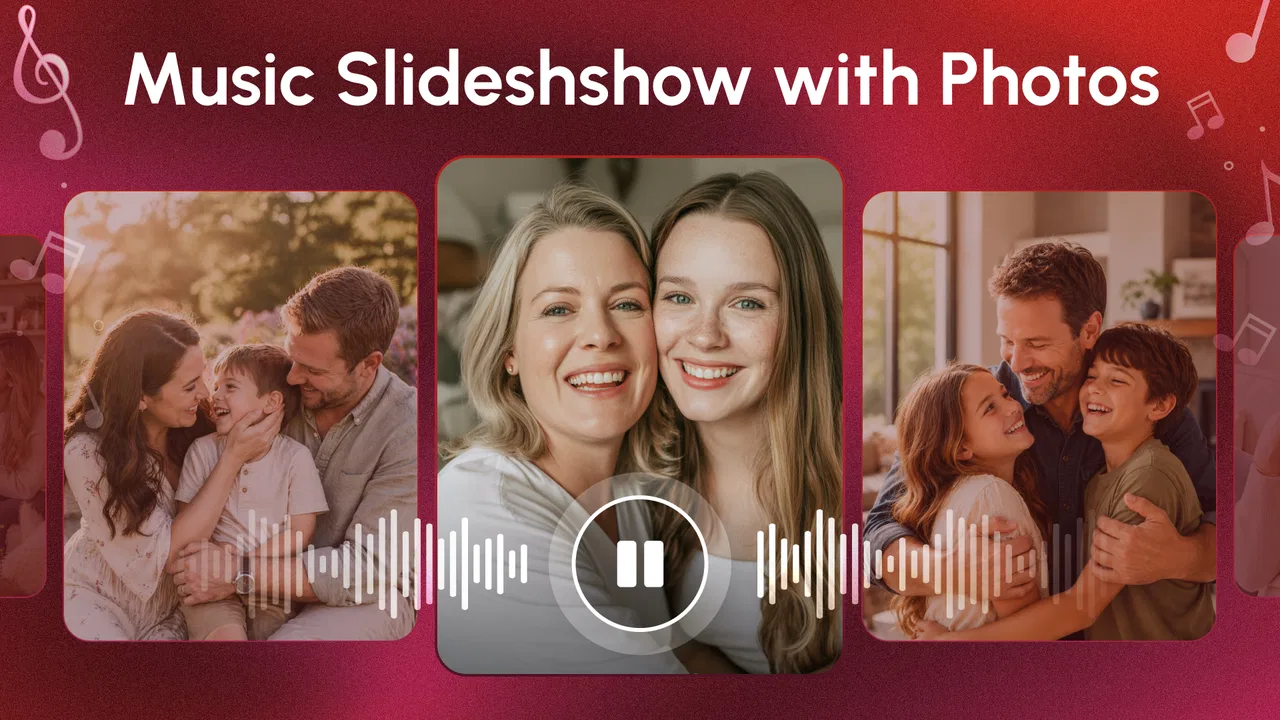
If you have a folder full of phone photos and want to turn it into something you can actually share, Photo Video Maker With Music is a friendly place to start. I see it as a straightforward video-making app for people who want a finished slideshow without learning a full editing suite. Its focus is simple: choose images, arrange them, add music, and produce a video that feels more personal than a static album.
That simplicity is the main reason I would recommend it to a first-time editor. You do not need to understand timelines, tracks, keyframes, or complicated export settings before making your first project. At the same time, I would not mistake it for a replacement for a serious mobile editor. It is better suited to photo stories, celebrations, travel recaps, family memories, and quick social clips than to detailed video production.
The app is free to install and is listed for everyone, which makes it easy to try without committing money at the beginning. Optional purchases range from around two dollars to around sixty-six dollars per item, so I would pay attention to any purchase screen before confirming anything. The developer is Eco Mobile Editor, and the app has built a substantial audience: its average is 4.6 from over 222 thousand ratings, with more than 50 million installs.
You May Also Like

 Blood Strike: 2.5 Anniversary
Blood Strike’s Loadouts Turn Every Drop Into a Tactical Gamble
A close look at Blood Strike’s custom loadouts: how fast access to signature weapons reshapes its battle royale rhythm, rewards preparation, and narrows the gap between fights.

 Pandora - Music & Podcasts
Pandora’s Music Is Easy to Start, but Harder to Recover
Pandora’s strength is its low-effort path from a seed to a station. Its weak spot is how much confidence it asks you to place in connection, setup, and quiet recovery.

 8 Ball Pool
 Is Built on Rivalries, Rematches, and Routine
A close look at the rivalries, rematches, shared routines, and unanswered safety questions that turn a quick pool match into a persistent mobile community.

 Samsung Music
’s Quiet Strength Is Playing What You Already Own
Its reach comes less from spectacle than from dependable access to a personal library. That simplicity is both the app’s strongest retention engine and its ceiling.

 AccuWeather: Weather Radar
AccuWeather Review: A Quick, Clear Forecast for Everyday Decisions
For everyday plans, the best forecast is the one you can understand quickly. AccuWeather makes rain timing, radar, and local conditions easy to act on, with a few trade-offs.

 Hill Climb Racing
Why Hill Climb Racing Still Turns Crashes Into One More Run
A tiny car, a bumpy hill and one more upgrade: Hill Climb Racing keeps resurfacing because its simple chaos makes every near-miss feel personal.
More From Our News Desk



Getting from your photos to a finished video
I’d use this section to focus on the choices that make a photo montage feel intentional: grouping images by one occasion, picking a clear opening shot, and deciding what feeling the music should carry. A small draft is easier to assess than a camera-roll-sized project, so I’d check the sequence before adding more. That editing mindset also helps explain where a simple photo-first workflow is useful—and where a more hands-on editor may suit you better.
What the first screen suggests
My first impression is that the app is designed around a single reassuring idea: start with material you already have. Instead of asking a new user to record, trim, and organize video clips immediately, it makes photos the natural starting point. That matters if your camera roll is mostly still images or if you are making a slideshow for someone who is not comfortable with editing software.
A useful way to approach it is to decide on the story before opening the editor. For a birthday, I would gather the arrival photos, the main moment, and a few closing images. For a trip, I would select pictures in rough chronological order. This small bit of preparation prevents the project from becoming a random sequence of every image in a folder.
The app belongs in the video players and editors category, but its personality is closer to a photo-story builder than a professional cutting room. That distinction helps set expectations. It is not the tool I would choose when the main material is dialogue, action footage, or a project that needs precise control over every second. I would choose it when the images carry most of the meaning and music is there to create mood.
Setting up a first project without overthinking it
On a first attempt, I recommend making a small test project rather than beginning with a large family archive. Select a handful of photos that clearly belong together. A short set lets you see how the sequence feels, whether the opening image works, and whether the music supports the mood. It also makes it easier to correct an ordering mistake without feeling that you have lost an entire evening.
When choosing images, look for variety in distance and subject. A series of nearly identical pictures will feel flat even if the app presents them neatly. I usually place a wide scene near the beginning, follow it with closer details, and save the most meaningful image for the end. This is a simple editorial trick, but it makes an automatic-looking slideshow feel more intentional.
One of the more useful habits is to treat the first photo as an introduction rather than merely the first file selected. A clear image gives the viewer immediate context. If the video is a weekend recap, an establishing travel picture works better than a blurry snapshot from the middle of the day. This is not a special effect; it is a way to get better results from the app’s uncomplicated workflow.
The first meaningful success
The first satisfying result comes when the sequence, music, and pacing begin to feel like one small story. I would not judge the project while editing only the individual images. Preview the complete flow instead. A picture that looks ordinary by itself may work well as a transition, while a beautiful image may slow the story if it sits beside several similar shots.
Music deserves more attention than many beginners give it. I would choose a track based on the feeling of the photos rather than selecting the loudest or most dramatic option. Calm images can be overwhelmed by energetic music, while a lively celebration may need something with more movement. If the result feels awkward, changing the soundtrack can improve the whole video faster than rearranging every photo.
The fastest route to a good first result is a small, carefully chosen photo set rather than a large collection with no clear order. This is also where the app’s accessible design works in its favor. You can concentrate on the story instead of spending your first session learning a complicated interface.
How I would use it in everyday life
Imagine coming home from a family day out with a mixture of portraits, food, scenery, and a few imperfect but funny moments. I would create a short project that opens with the location, moves through the people and activities, and ends with a relaxed final image. Adding music turns the collection into something easy to show relatives who were not there.
Another practical use is a simple thank-you video. A new parent, graduate, or departing coworker may have photos scattered across a phone. Rather than sending dozens of separate images, I would group the strongest ones into a visual message. The app is especially useful here because the recipient does not need to install an editor to understand the result.
It can also help someone who wants a more polished social post but does not want to appear on camera. A sequence of product photos, craft projects, meals, or artwork can become a compact presentation. I would keep the selection focused and avoid trying to explain everything in one video. The app can organize visual material, but the user still has to make the editorial choices.
Where new users may hesitate
The most common confusion for a beginner is likely to come from expecting every editing app to behave like a desktop timeline. A photo-based workflow can feel limited if you are searching for frame-by-frame trimming, detailed audio mixing, or complex layers. My advice is to work with the app’s central idea instead of fighting it: build a visual sequence first, then make modest adjustments that improve its flow.
Another point to watch is the difference between selecting photos and creating a coherent narrative. The app can help assemble the material, but it cannot know which image is emotionally important, which one is repetitive, or which picture should be removed because it is technically poor. I would review the project once for order and again for quality. That second pass often makes a bigger difference than adding another visual treatment.
Some users may also wonder whether a free app is enough for a finished personal video. For casual use, it can be a sensible starting point. However, optional in-app purchases are available, priced from around two dollars to around sixty-six dollars per item. I would use the free experience first and only consider paying after deciding that the app fits my regular workflow. There is no reason to buy extras simply because they appear during an enthusiastic first session.
Making the result feel less automatic
A basic slideshow can look generic when every image receives equal attention. One improvement is to vary the visual rhythm through selection: use a few strong images instead of including every acceptable one. Another is to arrange pictures by a clear emotional or chronological progression. Even without advanced editing controls, these choices give the viewer a reason to keep watching.
I also recommend checking the beginning and ending separately. The opening should explain what the video is about quickly, while the ending should feel deliberate rather than like the remaining photos ran out. If the final image is meaningful, leave it in a position where the viewer can absorb it. A closing family portrait, landscape, or finished project often works better than an accidental last frame.
For a first-time user, this is a valuable lesson: editing is often more about removing weak material than adding decoration. The app’s accessible approach makes that lesson easy to apply. A smaller project with a clear point usually feels more polished than a longer one packed with duplicates.
How it compares with familiar alternatives
Compared with a full mobile video editor, this app feels less intimidating but also less suitable for precision work. A conventional editor is the better choice when you need to combine recorded clips, control spoken audio, place text at exact moments, or build several visual layers. Those tools reward patience and offer more room to grow, but they can be excessive for a simple photo montage.
Compared with a phone’s built-in gallery movie feature, Photo Video Maker With Music is appealing when you want a more deliberate editing session rather than an automatic memory reel. The advantage is the sense that you are choosing the sequence and mood yourself. The trade-off is that you still need to spend time reviewing the result; convenience does not remove the need for taste.
Compared with a template-heavy social editor, it may feel less focused on instant trends and more focused on personal images. That can be a strength for family videos or private memories, where a preset style may distract from the photos. On the other hand, someone who wants animated captions, elaborate transitions, or a highly branded short-form post may be happier with a more advanced alternative.
Who should use it, and who should skip it
I think it is a good match for first-time editors, families, students preparing a visual presentation, and anyone who wants to make a photo-and-music video without studying a complex interface. It is also useful for people who prefer to work from still images rather than record themselves. The Everyone content rating makes it a broadly approachable choice for ordinary personal projects.
I would suggest looking elsewhere if your project depends on detailed video correction, precise narration, sophisticated transitions, or extensive text animation. The same applies if you need a professional workflow with fine control over timing and audio. The app’s strength is reducing the distance between a folder of photos and a shareable video; its weakness is that this streamlined path may feel restrictive once your ambitions become more technical.
Practical expectations about compatibility and upkeep
The current version is 2.5.75, and the app requires Android 8.0 or later. That makes checking the operating system on an older phone a sensible first step before planning a project. If you are preparing a video for an event, I would test the app and create a small sample in advance rather than waiting until the day itself.
Because the app is free, the initial decision is low risk, but the purchase range means I would still read each on-screen option carefully. A free installation does not mean every possible addition is included at no cost. Starting with a personal test project is the clearest way to learn what the basic workflow can do before spending anything.
I would also keep the original photos untouched. Build the video from copies or from the existing gallery without treating the project as a replacement for your photo library. This is good practice with any editor, especially when a video is meant to mark an important occasion. The finished montage is one presentation of the memories, not the only version you should keep.
My recommendation after using the workflow
What I like most is the short path from intention to result. If I tell a friend, “I want to make something from these photos,” this is the kind of app I can suggest without first giving them a lesson in editing terminology. The photo-first design keeps the focus on choosing meaningful images and matching them with music, which is exactly what many casual users need.
What keeps me from recommending it for everyone is the same simplicity. Once I want deeper control, I would move to a more capable editor rather than trying to force this app into a professional role. It is also worth remembering that a polished outcome depends on selection, order, and pacing; the app makes those decisions easier to execute, but it does not make them automatically.
For a first meaningful success, I would make a short travel recap or family greeting, use only the strongest images, preview it more than once, and adjust the sequence before considering optional purchases. That workflow gives a new user a clear answer to the most important question: can this app turn my own photos into something I am happy to show?
My final view is positive, with sensible limits. Photo Video Maker With Music is a practical free starting point for photo-based videos, especially when ease matters more than advanced control. Its large install base and strong 4.6 average suggest that many people find this approach useful, and I can understand why. I would recommend it to anyone who wants a personal slideshow with music and a gentle learning curve, while steering demanding editors toward a full-featured alternative.
FAQs for Photo Video Maker With Music
01What features does the Photo Video Maker With Music app offer?
The Photo Video Maker With Music app allows users to easily create stunning videos by combining photos, videos, and audio tracks. It offers a variety of editing tools, such as filters, transitions, and text overlays. Users can also choose from a library of music or upload their own tracks to enhance their creations.
02Is the Photo Video Maker With Music app user-friendly for beginners?
Yes, the app is designed with an intuitive interface that is perfect for beginners. It offers step-by-step guidance through the video creation process. With drag-and-drop functionality and simple editing tools, even those with no prior experience can produce professional-looking videos with ease.
03Can I share my videos directly from the Photo Video Maker With Music app?
Absolutely! Once your video is complete, you can easily share it directly from the app to various social media platforms such as Instagram, Facebook, and YouTube. The app also allows you to save videos to your device in various resolutions, making it convenient to share your creations anywhere.
04Does the Photo Video Maker With Music app offer in-app purchases?
While the app is free to download, it does offer in-app purchases for additional features. These may include premium music tracks, advanced editing tools, and the removal of ads. Users can still access basic functions without purchasing, but the premium options enhance the overall experience.
05What are the system requirements for the Photo Video Maker With Music app?
The app is compatible with both Android and iOS devices. For Android, it requires version 5.0 and up, while iOS users need version 11.0 or later. To ensure smooth performance, it is recommended to have at least 2GB of RAM and sufficient storage space for saving videos.
Pros
- Easy-to-use interface for beginners.
- Wide variety of music tracks available.
- Supports high-quality video export.
- Multiple editing tools for creativity.
- Regular updates with new features.
Cons
- Limited transitions in free version.
- Occasional ads disrupt editing flow.
- No cloud storage integration.
- Requires internet for music library.
- Lacks advanced editing features.

Photo Video Maker With Music
Gallery